Saturday, January 26, 2019

How to run JavaScript source files?

First method, use JavaScript online editor


You can go to CodePen (https://codepen.io/) and in the JavaScript window you can paste the code and experiment.

Second method, running JavaScript code from a HTML document

Make a HTML file and embed JavaScript Code

Make a JavaScript file. Put your JavaScript code in this file
In the HTML file, include script tag and refer to the JavaScript file you have created.
Run the html file in any browser.

Inline JavaScript file

HTML document
  1. <!doctype html>
  2. <html>
  3. <head>
  4. <title></title>
  5. </head>
  6. <body>
  7.  
  8. <script>
  9. console.log("javascript is working");
  10. </script>
  11. </body>
  12. </html>


Embed JavaScript file

HTML document
  1. <!doctype html>
  2. <html lang="en">
  3. <head>
  4. </head>
  5. <body>
  6. <h1>Testing JavaScript</h1>
  7. <p>Open Web Browser's developer tools Console window and reload this page.</p>
  8. <script src="code.js"></script>
  9. </body>
  10. </html>

code.js document

  1. alert("Hi world");

References

https://www.webtoolkitonline.com/javascript-tester.html
https://js.do/
https://jsfiddle.net/

Resources

Hackr.io (Find & share the best online programming courses & tutorials)
Free Code Camp (www.freecodecamp.com)
Team Treehouse (www.teamtreehouse.com)
Codewars (codewars.com)
iLoveCoding Javascript Screencasts (https://ilovecoding.org)
Codementor(https://www.codementor.io/javasc...)
CodeCloud (CodeCloud.me)
Codecademy (http://www.codecademy.com/#!/exe...)
Lynda (http://www.lynda.com/JavaScript-...)
Channel9 (http://channel9.msdn.com/Series/...)
TheCodePlayer (Learn HTML5, CSS3, Javascript)
Eloquent Javascript Book (http://eloquentjavascript.net/co...)0
Javascript by Douglas Crockford (Douglas Crockford's Javascript)
CodinGame (http://www.codingame)
Mozilla (https://developer.mozilla.org/en...)
Udacity (JavaScript Basics for Beginners Course)
Egg Head (egghead.io - Learn professional JavaScript tools with Tutorial Videos & Training)
CodeSchool: Start with Free Courses at CodeSchool
Pluralsight: (JavaScript)

Tuesday, January 22, 2019

Closures?

Closures in JavaScript?

I have been looking and playing with web components. I found it a bit too easy to install and use web components in a web page. So I decided to have a good look in how things worked. Geez, I came across a lot of things that I wasnt familiar with. I thought I was a competent Javascript coder. No!

What really puzzled me was  these anonymous functions and these weird self contained function calls of this following format

(function () {
 var Avariable = 'Weird self contained function call';
 alert(Avariable);
}) ();

console.log(Avariable);


This pattern is a closure. A closure is a combination of  function and the set of available variables in which the closure was defined.

Kyle Simpson's Scope and Closures book ("You don't know JavaScript" book series) said this succinctly; Closure is when a function is able to remember and access its lexical scope even when that function is executing outside its lexical scope.

Still it is not that clear to me. I dug up my old Sitepoint book "The art and science of JavaScript", and I learnt that a closure is created when a function is defined within another function. If the inner function is accessed from outside of its containing function, it still has access to the scope in which it was originally defined even though the variables in that scope are not accessible to any other functions or variables.

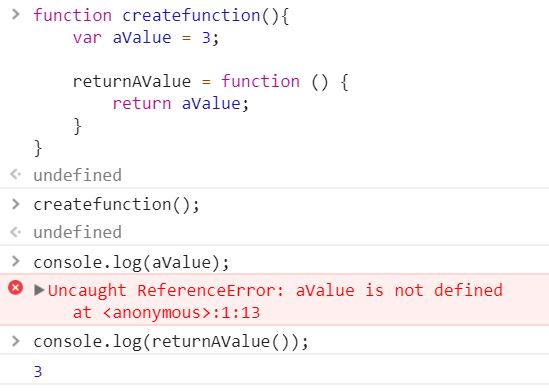
A bit better... As I am a visual learner, I created a simple function with an inner function and used the Console which is a part of Chrome browser to see how it works.

Example

// an outer function createfunction() and an inner function returnAValue that still has access to
// the aValue even when createfunction() goes out of scope.
function createfunction(){
var aValue = 3;

returnAValue = function () {
return aValue;
}
}


createFunction();
console.log(aValue); // Undefined
console.log(returnAValue()); // Returns a value of 3.


It makes sense now. Now onto partial function applications.

Partial Function application

Closures are useful for functions that prefill some of their own parameters.

Reference
http://www.webreference.com/programming/javascript/rg17/index.html

Self executing function pattern 

(immediate invoked function expression)

That was another pattern that got me stumped. I had to play around and now I find them very powerful and very clean. I see them all over the place in well written JavaScript code!


Sunday, December 10, 2017

Few things about NPM and Package Managers

What is a command line and a package manager?

First of all, what is a command line or command prompt in Windows?

A command-line interface or command language interpreter (CLI) is used to execute commands within the terminal window, typed in by the user. Most of those commands are used to automate tasks via scripts and batch files.

You can then use various commands such as

  1. cd or chdir to display the current directory or change the current folder
  2. cls to clear the screen
  3. dir to display a list of folder's files and sub folders.

How do I launch launch The Command Prompt From The Run Window?

One of the quickest ways to launch the Command Prompt is to use the Run window (press Win+R on your keyboard to open it). Then, type cmd or cmd.exe and press Enter or click. The Terminal window pops up and shows the C:\Users\DeafDave which is the starting point.


What about PowerShell?

A shell is a user interface that gives you access to various services of an operating system. A shell can be command-line based or it can include a graphical user interface (GUI). Windows PowerShell is a  powerful shell developed by Microsoft. This PowerShell is much more powerful than the command prompt and is used for task automation and configuration management. This shell is based on the .NET framework.

There is also the Windows PowerShell ISE, a graphical user interface . ISE stands for Integrated Scripting Environment which allows you to easily create different scripts without having to type all the commands in the command line.


The fast way of launching PowerShell is to use the Run dialog. Press Windows + R keys on your keyboard to open the Run window, enter " powershell" inside and then press OK.


Reference


What is a package?

A software package manager installs the packages you want to use and provides a useful interface to work with them from your PC.  npm is one of the most popular software managers and makes it easy for you to share and update files with your co workers. To use npm, you need to have Node.JS a Chrome's JavaScript runtime module.

Bower is a Node module so to get it. You need to install npm and Git applications on your computer. Bower packages are Git repos. Bower uses Git to understand where the package is, what version it's on—that sort of thing.

node.js
Node.js is a platform built on Chrome's JavaScript runtime for easily building fast and scalable network applications. Node.js uses an event-driven, non-blocking I/O model that makes it lightweight and efficient, perfect for data-intensive real-time applications that run across distributed devices.
https://nodejs.org/en/

npm
node package manager for node.js. npm is a NodeJS package manager. As its name would imply, you can use it to install node programs. Also, if you use it in development, it makes it easier to specify and link dependencies.

Bower
Bower is just a package manager. The important thing to note here is that Bower is just a package manager, and nothing else. Its singular purpose is to manage packages. You can find it at https://bower.io/

Bower is a command line utility. Install it with npm.
$ npm install -g bower
Bower requires node, npm and git.

Prior to Polymer Version 3, to build Google Polymer's web components, you would use Bower. Bower is a convenient way to quickly build web components by collecting Google Polymer's elements together to build a Polymer ready web component.

More on them later.

Over and out!
Deaf Dave.

References
https://css-tricks.com/whats-great-bower/
https://www.npmjs.com/
https://www.sitepoint.com/beginners-guide-node-package-manager/
https://docs.npmjs.com/getting-started/what-is-npm


How do I run a web page on a local host?

This is a common question for beginning web developers. You want to run your web application locally without uploading it to your webhost yet. You need to have a local web server to develop and display web pages locally on your PC. This is done by using a local host instead of using a server on the internet.

Why would you do that? Save time and money by developing and breaking web pages on your PC! You do not want people on the internet to use your web pages that are quite unfinished or are broken because you are still experimenting or figuring out a problem. You wish to develop, test and run web pages yourself first. So using a local web server is the answer.

I will talk about the Apache web server first. This Apache is a web server and its main purpose is to serve web documents such as HTML, PHP and ASP  files. The process is as follows for a PHP document for example;  the PHP file is sent to the interpreter on the server side, the server parses and processes this file and then sends the rendered file back to the browser. The server is just serving pages to your browser (the client).

Your local web server has a root directory which is wwwroot (IIS) or htdocs (apache, xampp) or something else like public_html, www or html, etc. The web server configuration depends on your OS and web server.

Once you have installed a web server on your PC, and if you type http://localhost into your browser, your browser will be directed to this webroot and the server will serve any index.html, index.php, etc. it can find there (in a customizable order).

If you have a project called "mytutorial" you can enter http://localhost/mytutorial and the server will show you the index-file of your tutorial, etc. If you look at the absolute path of this tutorial folder then it's just a subfolder of your webroot, which is itself located somewhere on your hard drive, this absolute path is mapped to the localhost.

So the relative path is
http://localhost/mytutorial

while the absolute path may be
c:/webservices/apache/www/mytutorial
or
c:/xampp/htdocs/mytutorial

If you're working with  a web authoring package like Adobe's Dreamweaver you can simplify the testing process by setting up your local server as a testing server in your project settings. easy. Once it's done, you can just press the browser icon with any of your files and it will open on localhost.

Example
I installed Aprelium, a light weight web server on my PC.
http://aprelium.com/abyssws/download.php
localhost:80/
http://locallost:80/

The server runs code from C:\Abyss Web Server\htdocs\..

I dropped a set folders of Web Components code examples in the
C:\Abyss Web Server\htdocs\

Then I could run a web page in Google Chrome for example;
http://localhost/Chapter1/shadow-dom/shadowDOMDemo2.html

and the absolute path may be
C:\Abyss Web Server\htdocs\Chapter1/shadow-dom/shadowDOMDemo2.html


That's it!

References

http://1stwebdesigner.com/local-web-server/
https://blog.xervo.io/absolute-beginners-guide-to-nodejs
http://stackoverflow.com/questions/20748630/load-local-javascript-file-in-chrome-for-testing?

Monday, December 4, 2017

A simple todo list app

A Simple ToDo  App with HTML, CSS and Javascript

David Parker December 4th 2017


I built a simple ToDo app first in one HTML file that has CSS styles in <style> </style> and Javascript in <script> </script> blocks respectively. My aim was to learn about DOM and the localStorage object and use them in this simple ToDo app.

We use a button and an onclick event handler to call the addItem() or removeItem()function when the button is clicked. We use DOM (Document Object Model) to manipulate the objects in a DOM tree. Each object in the DOM can represent a HTML element on a web page.

We use Javascript to have access to DOM's APIs. We use the LocalStorage object to persistently store the state of the todo items. Otherwise every time we do a refresh for example pressing the F5 key button, the todo items will be cleared and reset. We don't want that!

DOM methods


getElementById

getElementById is a method that fetches the HTML element on the webpage by its id attribute.
An example,
document.getElementById("password");

innerHTML

innerHTML is a text based DOM property of a HTML element.
An example,
newItem.innerHTML = document.getElementById("box").value;

createElement

createElement is a DOM method that creates a new floating and disconnected HTML element. You need to attach the new element to register in the DOM tree.
An example,
var newItem = document.createElement("div");

appendChild

appendChild is a DOM method that attaches the child element to an existing element on a web page.
An example,
document.getElementById("list").appendChild(newItem);

removeChild

removeChild is a DOM method that removes the child element from the existing element.


So with these getElementById, appendChild, removeChild and createElement methods, they allow me to add or remove a new item to/from the list in the todo app. Every time a new item is added or removed to/from the list, the list is also saved.

The source code for the two functions, addItem and RemoveItem.
// The value from the input field is added to the list below
function addItem() {
   var newItem = document.createElement("div");
   newItem.innerHTML = document.getElementById("box").value;
   newItem.onclick = removeItem;
   
   document.getElementById("list").appendChild(newItem);
   saveList();
}

//The to do item in the list is removed and the ToDoList is saved.
function removeItem(){
   document.getElementById("list").removeChild(this);
   saveList();
}

Everytime I click on Add item button, the contents of the input field is copied and the <list></list>'s innerHTML contents are refreshed.

If I wish to remove an item from the list, I just click on the existing item and it is then removed by the removeChild method. The this keyword parameter references the child item element within the list element. So basically the item in question is then removed by the onclick event that is attached to this item.

There is a risk of generating a too long to do list. A simple solution is to check for the maximum number of items that can be added to the list. So I chose a arbitrary value of 28 'to do items' that can fit in the light yellow to do list on the web page. More than 28 to do items will not be added.

The to do items are saved in the localStorage object as part of the DOM.

Full source can be found here. I hope you found this short article useful. Deaf Dave.
» www.deafdave.com.au/webdev/todo/todoapp.html

More information about DOM can be found at

» https://developer.mozilla.org/en-US/docs/Web/API/Document_Object_Model

More information about the console.log object

» https://developers.google.com/web/tools/chrome-devtools/console/ 


The next step is to use Polymer web components and advanced Javascript techniques to manage the ToDo list better. This will be covered in the next article.

Sunday, November 19, 2017

Oldest Computer

The oldest computer can be traced back to Adam and Eve.


Surprise, surprise.

It was an Apple.

But with extremely limited memory.

Just 1 byte.

Then everything crashed.

Monday, November 21, 2016

Polymer - Web Components Exploration

Polymer - Web Components Exploration


There have been lots of questions and things I didn't know when I first started looking at Polymer since October 2016. It has been 6 weeks ever since. I have answered many of these questions that came up when I was exploring this Polymer website by myself. I really enjoy exploring and answering my own questions.  JSON files. Data binding. NMP. Bower. Package Manager. Closures. Frameworks. Material Design. Elements. Custom tags. Projects. Debugging. And so on.

I look. I read. I procrastinate. I nap a lot. I dig. I do things. I break things. I get frustrated easily. I don't give up easily. I feel good once I get things working! My plan of attack is to break problems into smaller problems and solve them one at a time. I can be slow at times but once I get it, I am FAST!

For the last few weeks, I went over JavaScript and I looked into the meta programming - especially function closures and JavaScript objects. I have ordered a few advanced JavaScript books and I will be writing future posts on these topics.

I came across a great simple tutorial on what is a web component. This article said web components is a new HTML technology that makes it easy for you to create web apps. There are short lessons in this website that introduces the following concepts (HTML tags, how to use web components in any web browser, changing the attributes for custom HTML tags on the fly etc) and try them out in interactive live demos. Nice and easy.

This tutorial can be found at » https://component.kitchen/tutorial

Polymer Project

I keep visiting this Polymer Project website. This website can be found at » https://www.polymer-project.org/1.0/ This is an elegant and clean website. I can use web components with confidence. My next plan is to select and use web components in my rather out of date website at www.deafdave.com.au.

I have a few ideas to build new custom web components. A small Auslan fingerspelling alphabet translator web component that changes words into fingerspelt icons on the fly. A silly and useless purple web component. A star wars scrolling web component. These three are the ones I wish to build asap.

My ultimate goal is to build a Polymer based app... It is exciting!


Over and out.
Deaf Dave.

Wednesday, November 16, 2016

Material Design used in Polymer development.

Material Design as part of Polymer

To recap, Google Polymer is an open source JavaScript library composed of web components that is used for building web applications seamlessly. This Polymer library is available on GitHub. The Polymer user interface framework supports custom elements, shadow DOM, HTML imports and templates and modern design principles. In this short post, I would like to write a bit about material design.

Material Design is a design language by Google released on 25 June, 2014 at the Google I/O conference. "Expanding upon the "card" motifs that debuted in Google Now, Material Design makes more liberal use of grid-based layouts, responsive animations and transitions, padding, and depth effects such as lighting and shadows." Sourced from Wikipedia. This design language was used to build Gmail, YouTube, Google Drive, Google Docs, Google Maps etc.

From the Google's Material Design website;
"Material design is guided by print-based design elements – such as typography, grids, space, scale, color, and imagery – to create hierarchy, meaning, and focus that immerse the user in the experience."

Image result for Google's Material Design with Polymer

Material Design has four design principles:
  1. Tactile Surface
  2. Publishing Design
  3. Meaningful Animations
  4. Adaptive Design

  • Tactile surface represents the layers of "digital paper". These layers are arranged at varying heights to simulate depth and cast shadows on each other. This is analogous to stacked papers.
  • Publishing Design represents "digital ink" that is the use of fonts and typography, colours and photos for example.
  • Meaningful animation represents how controls on a web page interact with the user for example.
  • Adaptive design is a method that allows designs to represent consistently across different web based devices with different resolution and screen sizes.

Wireframes are useful to help organise space and padding for different screens of devices. More information can be found at https://material.google.com/resources/layout-templates.html#layout-templates-whiteframes

In a nutshell, Material Design unifies visual, motion, and interaction design across different types of devices. It's modeled after tactile materials like paper and ink with fluid animation and lighting. Polymer brings these paper elements to life on the web. So the Google Design team came up with an unified approach to building consistent user interface across different web based devices.

Over and out
Deaf Dave.

References
  • https://elements.polymer-project.org/guides/responsive-material-design-layouts
  • https://material.google.com/
  • https://en.wikipedia.org/wiki/Material_Design
  • https://www.smashingmagazine.com/2015/10/responsive-material-design-app-with-polymer-starter-kit/
  • https://www.smashingmagazine.com/2014/03/introduction-to-custom-elements/


Musings about Web Components and Community work

I have been thinking lots about web components but I am not actually building them yet. Procrastination has set in I think! Its November and the silly season is creeping upon us rather too quickly.

I have also been thinking about the meta side of things especially with web components and my life as a Deaf person. I did a quick course in jQuery and it has provided me the tools to quickly fetch and update individual elements on a web page. but I realised what if I have multiple pages and they needed to communicate across by exchanging data then it all gets messy quickly. On one hand, jQuery is useful for encapsulating low level routines into higher level functions or objects for instance but the other hand its all rather fine grained. So I came across frameworks. Angular JS is one of them and the ability to decouple data, views and controller modules helps the developer manage the complexity of building and deploying web applications. So that's the MVC paradigm. Ok I would like write more about this MVC but that's for a future blog post.

It has been like 7 years since I worked in the software engineering industry (Altium - an Electronics Design Automation world class company) and I miss this type of work terribly.I worked as a software engineer, application engineer and finally as a technical writer for Altium and I worked extensively with Borland Delphi. I loved this tool. I came across Delphi components and how they helped me save time in coding and how it is easy to build applications with components.

I am a community manager for a little non for profit organisation funded by the Archdiocese of Sydney. I have done a lot of community work for the last 7 years. Why did I end up in the community sector after I was made redundant at Altium (no hard feelings!).   I was snapped up for lots of different jobs in the Deaf community after I left Altium. I taught many sign language courses for the Deaf Society of NSW. I designed and delivered lots of community courses and workshops for the deaf community in Sydney in the areas of family history research and Arduino - open source electronics prototyping boards. I thought it would be good to do something really different. The big pay drop was a blow I admit. It was only last year when I became a community manager, my salary was much more respectable.

On reflection, I realised there were things I could have done better when I was at Altium. I didnt know how to manage my anxiety issues. Thou I was an efficient worker and I had the great ability to get on with my co workers and have a laugh or two. I was able to hack into hard stuff and generate easy to understand technical documentation and generate useful code and script examples. That was so much fun.

I am a Deaf person and I use Auslan (Australian Sign Language). I found rather hard to cope being in a room full of people who can only speak and unable to sign Auslan. Now I am older and more mature. I think I am managing my anxiety issues very well. It is my fifth year with Movember - a charity devoted to helping men resolve their anxiety, depression and other related issues. I feel really good helping out. This is why I really enjoy helping people and finding solutions to make their lives easier. This attribute is important in all areas of work; whether it is community work or developing unique web components!

Fast forward to today.  I feel it is time for me to move on and harness the technical geek in me once again. I am ready to move on!

Wednesday, November 9, 2016

My observation of a Polymer Summit keynote video by Google

Tonight I went over to watch a couple of Polymer Summit 2016 videos on youTube (https://www.polymer-project.org/summit). What was great is that these videos are captioned. I was impressed that these videos have high quality captions with very few inaudible ones.

I chose to watch this keynote summit video at https://youtu.be/VBbejeKHrjg by Taylor Savage (what an unusual name). From what I have learnt by watching this video;

Web platform = confluence or a process of merging of three factors... 
1. Acceleration of mobile web development processes
2. Cross browser launch of web components
3. The launch of Polymer project 2.0

So for web development for computers, smart phones and tablets, basically these devices have different screen sizes. So mobile development have to keep this screen size factor in mind. We also have to account for offine mode (no internet access for instance). Slow internet or carrier speeds. Different code bases. All these constraints. Lots of different tools. Lots of overhead. Web development up to now is flaky and very hard to use and time consuming. 

Polymer - web platform

Google has built Polymer library and web components to support their emerging web platform. Now, Javascript is an essential part of the platform built by Google. This web platform needs to support
1. Scalar web apps
2. Web standards
3. Cross browser web components.  

These web components are supported by W3C which means we can easily build reusable web components. When Taylor talked about Web Components v1. A new Hope. I laughed at this one. I am a Star Wars fan too and own every DVD of every Star Wars movie that were released.

Going back to the Polymer and the web platform, we will have these custom elements and shadow DOM which are two critical specifications. Templates and HTML imports are not entirely supported by web browsers at this stage.

ES6 classes, modules, observers and properties

From this video, I came across ES6 modules, ES6 classes. Observers. Properties. What are they? I checked the Net via the good ole Google and came across the ECMAScript 6. 

These three websites helped me get more familiar with ECMAScript 6 features:


Up to now, Javascript classes in a nutshell are a bit different. Everything in Javascript is an object. We extend objects and add functions (methods) to them. Thats the drift.

What I now know about these ES6 classes is that JavaScript classes introduced in ECMAScript 6 are syntactical sugar over JavaScript's existing prototype-based inheritance. The class syntax is not introducing a new object-oriented inheritance model to JavaScript. JavaScript classes provide a much simpler and clearer syntax to create objects and deal with inheritance.  Source: https://developer.mozilla.org/en/docs/Web/JavaScript/Reference/Classes

So I had a look at this website, HTML Goodies at HTML Goodies - JS Classes tutorial to revise my knowledge of JS objects. I will do more work with Javascript's methods, properties, prototype keyword and Javascript Objects. In my next blog post, I will post up JS code examples that cover these features.

Three years since Polymer was shipped.

Polymer v0.5 in 2014
Polymer v1 in 2015
Polymer 2 currently

In regards to the Polymer platform, the web component v1 supports custom elements and ES6 classes for example. So for the developers who want to upgrade from Polymer1 to 2, they can use the hybrid feature which is a compatibility layer so they can individually renew and upgrade web components one at a time from v1 to v2 and run on Polymer2 seamlessly.


Polymer 2 overtime will get smaller. Currently the codebase is 12Kb which is tiny! As more and more browsers support web components, Polymer will get smaller over time. 

Polymer is being taken up by large companies like ING, EA, YouTube, Coca Cola etc. 500 projects with over 6000 elements. Polymer is like a living organic entity.

The Polymer web platform is evolving into an efficient ecosystem. This is very exciting.

I will need to find out more about these Polymer tools to help me build Polymer based custom elements and web applications. So the next step for me is to get familiar with the Polymer library and elements catalog. I will head over to the webcomponents.org (actually beta.webcomponents.org) website and have a play.

So it means there are Web component authors. So I will become a web component author eventually.

Standard Based Web platform

Basically once we have standard web components, they become the default components to use in web development. Standards based means enterprise grade applications. Standard based web components will  mean a wider community uptake and is community driven. That is not too different to the open source community where people can contribute.


Rob Dodson, a developer advocate

I then watched a brief video by a Developer Advocate, Rob Dodson on this youTube:
https://youtu.be/itTGnOMrTyc Taylor Savage gives Rob the highlights of his Keynote, touching on the next version of Polymer, Web Components and the growing community around it.

I will come back next week the middle week of November 2016 after I have finished watching this "How I learned to stop worrying and love the Polymer toolbox at Polymer Summit 2016"

Her summary of her talk is;
Think of your favorite app. It's probably meowni.ca/emojillate, but if it isn't (and we need to talk) it probably has one, if not all, of these things: a database; a potential for disaster, with many users looking at and clicking on the same data; offline support, a responsive layout while preferably being faster than the average bear. Recreating this experience from scratch might sound like a terrifying experience, but I'm going to show you how the polymer toolbox and a few other already-built elements can help you go from zero to hero and build a PWA - progressive web app in no time. Basic information about PWAs can be found at https://www.smashingmagazine.com/2016/08/a-beginners-guide-to-progressive-web-apps/

Demo: https://mojibrag.firebaseapp.com
Code: https://github.com/notwaldorf/mojibrag
Using the Polymer CLI: https://www.polymer-project.org/1.0/t... 
Polymerfire: https://github.com/firebase/polymerfire
App-localize-behavior: https://github.com/polymerelements/ap...

Ok, I will need to close this post and move on. So what does it mean to me... I need to learn more about Javascript/ES6 classes and to build custom elements that can run inside modern browsers. Lots of things I need to be aware of! Its very exciting indeed.


Over and out
Deaf Dave.

Friday, November 4, 2016

Using a Polymer Element for the first time

Hello, I logged into Polymer Project website today and the Polymer Project website has a beautiful minimal UI design.

I was in the mood for building something quickly today. So I went over to the » Polymer Summit 2016 website from Google Developers Code Lab and  I had a go in creating My Carousel Element demo project which is a Image Viewer that scrolls from the beginning to the end.

This Image Carousel project can be found at: » Polymer-2-Carousel


 I was able to get everything up and running the first go. Nothing went wrong. Nothing I misunderstood. I merely did a copy and paste from this website. I didnt go through the step folders provided by this website. I wanted to build the project from scratch.

I think the procedure was extremely well written that I was able to build a functioning web page the first go. This project has lots of hidden dependencies - the Polymer components such as the Carousel Image element, the Polymer server and all that.

Obviously I have a lot of learning to do so I quickly headed over to Web Fundamentals at Google Developers website. The website can be found at https://developers.google.com/web/fundamentals/getting-started/

I plan to use elements, build elements and finally build apps using Polymer over the coming weeks and months.

Over and out
Deaf Dave.

Sunday, September 4, 2016

My first technical article - Sept 2016

I have decided to create this blog using Google's blogger. Tech DeafDave is the title I chose. I think it is apt because I am a deaf person who is a true geek. However I am working as a community manager for a little non for profit centre funded by the Archidiocese of Sydney. This area of work is challenging spiritually for me. My next career change is to get back into the computing/technical world which is my passion. Why I ended up as a community manager after working as a software engineer/application engineer/technical writer for around 15 years is another story to be written.

My technical passion lies in the following areas:
1. Coding such as Python, Delphi,  HTML 5, CSS, the Javascript ecosystem (including jQuery and HTML5 geolocation)
2. Google's web platform the mighty Polymer
3. the Electronics ecosystem especially the mighty Arduino.
4. DSLR photography - astro and macro worlds
5. Family Heritage research - stories and analytical/detective work

I will be exploring these topics as I go by. My aim is to build up my coding and writing skills to a standard that I will be able to get into Google. I will be posting diagrams, code examples, analyses and my comments.

On a side note, I have been teaching "How to use Arduino" on a regular basis to a group of deaf people and at schools with deaf kids and I have been teaching Family Heritage workshops since 2009.

Over and out,
Deaf Dave.